

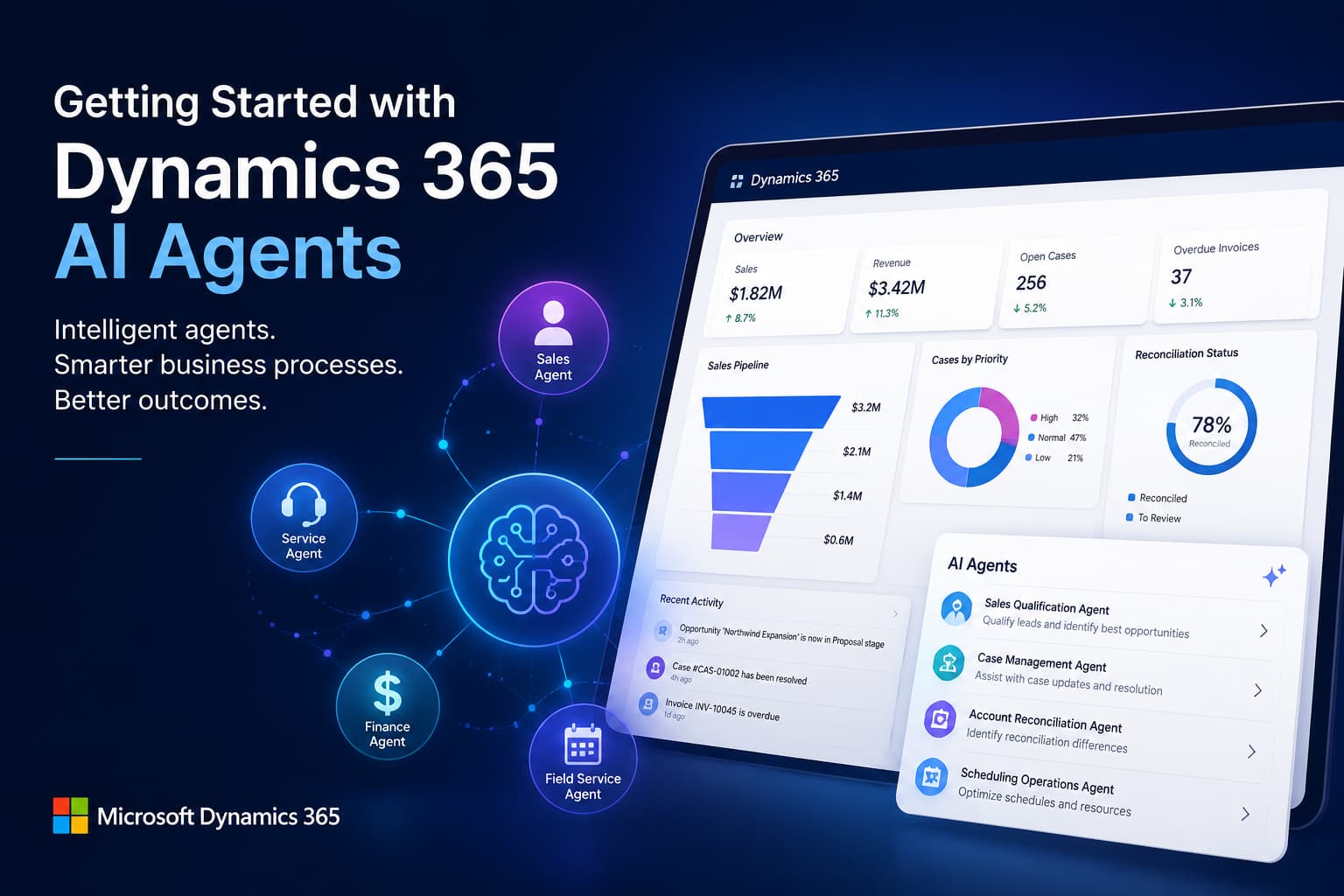
When Microsoft introduced Copilot, the goal was straightforward: help employees work faster by bringing generative AI into the applications they already use every day.
Employees could draft emails, summarize customer interactions, analyze business data, and generate content directly within Dynamics 365. These capabilities marked an important step forward in business productivity.
Now Microsoft is taking the next step.
Instead of building AI that simply responds to prompts, Microsoft is introducing AI agents that help automate business processes across ERP and CRM applications while keeping employees involved in decisions that require human judgment. Across Dynamics 365, the focus is expanding from AI-assisted productivity to agentic business applications.
For organizations already using Dynamics 365, this shift has important implications. AI agents don’t replace ERP systems or employees. They extend existing business processes by reducing repetitive work and allowing teams to focus on higher-value decisions.
This article explains what AI agents are, how they differ from Microsoft Copilot, where Microsoft is investing across Dynamics 365, and how organizations can prepare for the next generation of intelligent business applications. If you’re comparing Microsoft Copilot vs. Microsoft AI Agent capabilities, understanding how the two technologies complement each other is the best place to start.
At a Glance
| Question | Answer |
| What are AI agents? | Intelligent assistants that help complete business processes in Dynamics 365. |
| What’s the difference between Microsoft Copilot and AI agents? | Copilot helps individual users complete tasks, while AI agents help automate and support business processes. |
| Which Dynamics applications include AI agents? | Sales, Customer Service, Finance, Field Service, and more. |
| Can businesses build custom agents? | Yes, with Microsoft Copilot Studio. |
Microsoft Is Expanding AI Beyond Individual Productivity
The first generation of generative AI focused on helping individual users complete tasks faster.
Need to summarize an email thread?
Ask Copilot.
Need help writing a customer response?
Ask Copilot.
Need a summary of a customer opportunity before a meeting?
Copilot can generate one in seconds.
These experiences remain valuable, but they rely on the user initiating each interaction.
Microsoft’s newer AI strategy extends beyond individual assistance.
Instead of waiting for someone to ask a question, AI agents can monitor business processes, gather information, perform research, recommend next steps, and assist with activities that traditionally required employees to switch between multiple applications or complete repetitive manual work. Microsoft refers to this combination of AI agents, Copilot experiences, and embedded AI capabilities as the next evolution of Dynamics 365.
The key difference is this:
Rather than thinking of AI agents as “better Copilot,” think of them as specialized digital assistants designed to support specific business processes.
For example:
- Sales agents help qualify leads and identify opportunity risks.
- Customer Service agents assist with case management and knowledge creation.
- Finance agents help identify reconciliation differences.
- Field Service agents support scheduling and resource optimization.
Each agent has a clearly defined role within a business process rather than serving as a general-purpose chatbot.
Copilot Helps Employees. AI Agents Help Complete Business Processes.
Many organizations ask, “What is the difference between Microsoft Copilot and AI agents?” Although the two technologies work together, they serve different purposes.
Copilot is designed to improve individual productivity. It responds to prompts, summarizes information, drafts content, and helps users interact with business data more naturally.
AI agents build on those capabilities by supporting longer-running business activities. Rather than waiting for instructions, they can perform research, monitor events, recommend actions, and assist with multi-step workflows while keeping users informed throughout the process.
| Microsoft Copilot | AI Agents |
| Assists individual users | Supports specific business processes |
| Responds to user prompts | Helps complete multi-step workflows |
| Generates summaries, content, and recommendations | Performs research, monitors activities, and recommends actions |
| Improves employee productivity | Improves operational efficiency |
| Requires user interaction | Can operate throughout a business process while maintaining human oversight |
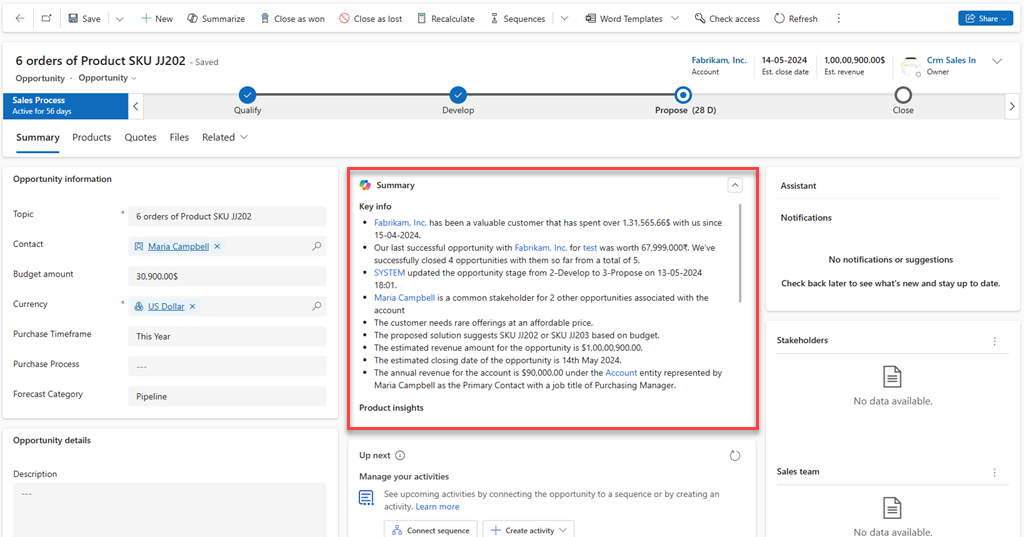
For example, imagine a sales representative preparing for an important customer meeting.
Copilot can summarize previous conversations, recent emails, and opportunity details.
An AI agent can go further by researching the opportunity, identifying potential risks, highlighting important customer changes, and recommending the next best actions before the meeting even begins.
The same concept applies throughout Dynamics 365.
Rather than replacing employees, AI agents reduce repetitive work so teams can focus on customer engagement and higher-value decisions.
To learn more about Microsoft’s AI strategy across Dynamics 365, see Microsoft’s AI capabilities in Dynamics 365.
The AI Agents Available in Dynamics 365 Today
Microsoft has already introduced several purpose-built AI agents across its Dynamics 365 ERP and CRM applications. Each one is designed to support a specific business function rather than act as a universal assistant.
| AI Agent | Dynamics 365 Application | Business Purpose |
| Sales Qualification Agent | Sales | Researches leads, qualifies prospects, and supports outreach |
| Sales Close Agent | Sales | Identifies opportunity risks, recommends actions, and supports deal progression |
| Sales Research Agent | Sales | Answers complex questions using CRM data and natural language |
| Case Management Agent | Customer Service | Assists with creating, updating, resolving, and closing support cases |
| Customer Knowledge Management Agent | Customer Service | Creates and improves knowledge articles using resolved cases |
| Quality Evaluation Agent | Customer Service | Helps supervisors evaluate customer interactions consistently |
| Account Reconciliation Agent (production-ready preview) | Finance | Identifies reconciliation differences and recommends resolutions |
| Scheduling Operations Agent (preview) | Field Service | Helps optimize scheduling and resource allocation |
Microsoft continues expanding AI capabilities across Dynamics 365 through its release waves, with additional agents planned for ERP and CRM applications. Because availability varies by application, licensing, region, and release status, organizations should verify which capabilities are available in their environment before planning an implementation.
Not Sure Which AI Agents Are Available in Your Dynamics 365 Environment?
Not every AI agent is available across every Dynamics 365 application or licensing plan. Availability also depends on your deployment, release wave, and Microsoft’s rollout schedule.
Calsoft can help you evaluate your current Dynamics 365 environment, identify the AI capabilities available to your organization, and recommend where to start based on your business goals.
Where Should Businesses Start?
The growing number of AI agents can make it tempting to focus on the technology first. In practice, organizations achieve the best results by starting with a specific business challenge and a single process where success can be measured. Once employees see the benefits, AI initiatives can be expanded to other areas of the business.
When evaluating AI agents, ask questions such as:
- Which business processes consume the most manual effort?
- Where do employees spend the most time searching for information or completing repetitive tasks?
- Which workflows create delays, bottlenecks, or inconsistent results?
- Where could AI improve productivity without increasing business risk?
For many organizations, these opportunities are found in areas such as lead qualification, customer service case management, financial reconciliation, or field service scheduling. These processes are repetitive, data-driven, and already supported by Microsoft’s first generation of AI agents.
Just as important is understanding your organization’s readiness. AI agents perform best when they’re built on accurate data, standardized processes, and consistent use of Dynamics 365. If customer records are incomplete or business workflows vary significantly across departments, those issues should be addressed before expanding AI adoption.
Rather than asking, “Which AI agent should we implement first?”, consider asking:
“Which business process would benefit the most from intelligent assistance?”
That shift in perspective helps organizations prioritize AI initiatives that deliver measurable business value while creating a strong foundation for broader adoption as Microsoft’s AI capabilities continue to evolve.
Where Can AI Deliver the Greatest Value?
The right starting point depends on your business priorities. Rather than evaluating every available AI agent, focus on the business process where intelligent assistance can deliver the fastest and most measurable improvements.
| If your goal is to… | Consider starting with… |
| Improve lead qualification and sales productivity | Sales Qualification Agent |
| Resolve customer issues more efficiently | Case Management Agent |
| Reduce manual effort during financial reconciliation | Account Reconciliation Agent |
| Improve technician scheduling and resource utilization | Scheduling Operations Agent |
| Build AI experiences for unique business processes | Microsoft Copilot Studio |
Wondering If AI Agents Are Right for Your Business?
The best AI strategy starts with understanding your business goals, processes, and data. We’ll help you determine whether AI agents, Microsoft Copilot, or another Dynamics 365 solution is the right fit.
Improving Lead Qualification and Sales Productivity
Sales teams often spend as much time preparing to sell as they do actually selling. Researching prospects, reviewing previous interactions, updating CRM records, and preparing follow-up emails are all necessary tasks, but they reduce the time available for customer engagement.
Microsoft is introducing several AI agents for Dynamics 365 Sales that help automate activities throughout the sales cycle. By reducing the time spent on research, data management, and other administrative tasks, these agents allow sellers to focus on building stronger customer relationships and advancing high-value opportunities.
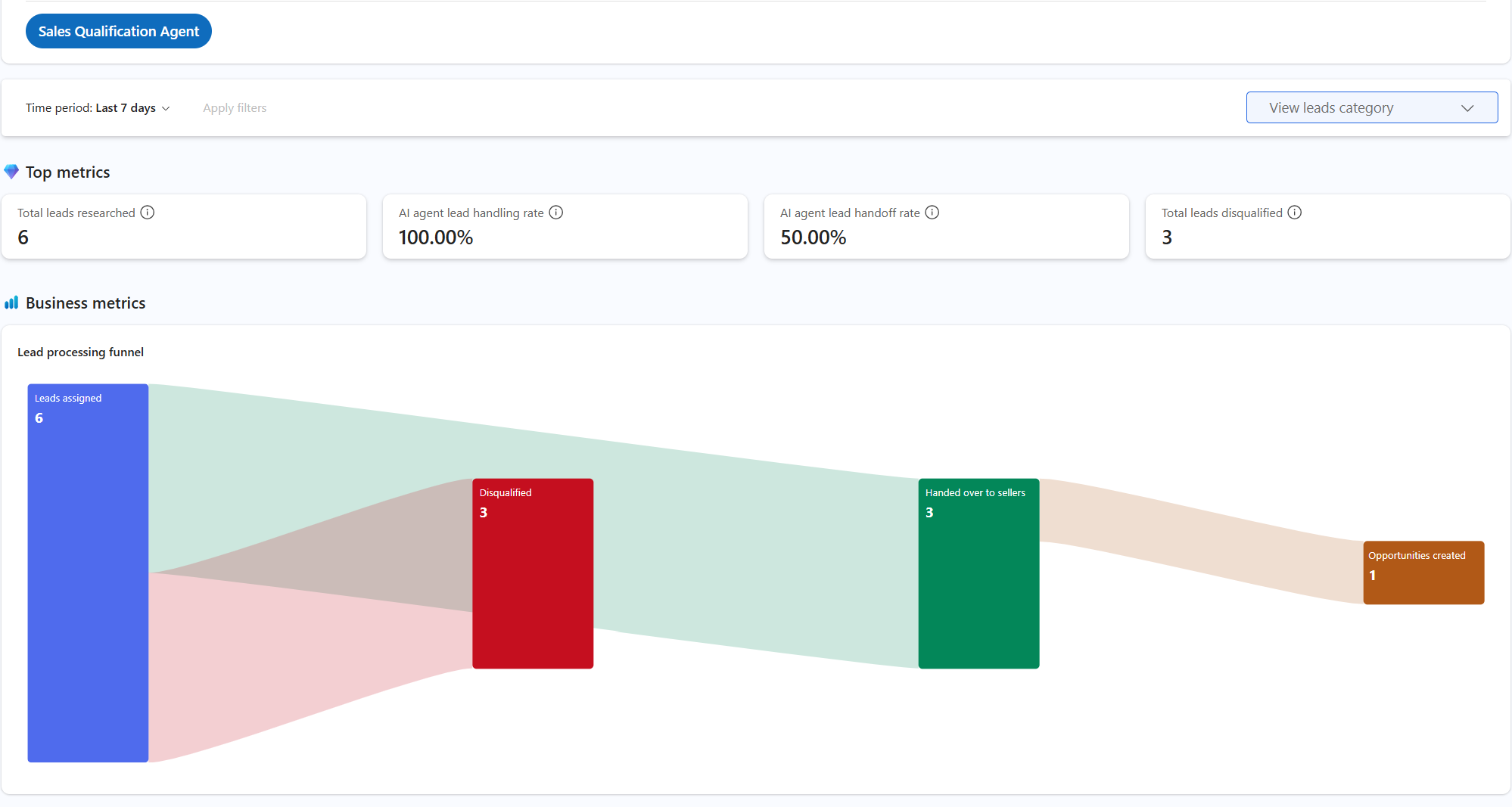
For example, the Sales Qualification Agent is designed to research inbound leads, evaluate available information, and recommend which prospects are most likely to warrant further attention. This helps sales teams prioritize high-value opportunities instead of manually reviewing every inquiry.
The Sales Research Agent helps gather relevant information about customers and opportunities before meetings. Instead of searching across emails, CRM records, and notes, sales representatives receive a more complete picture of the account in less time.
As opportunities progress, the Sales Close Agent helps identify deals that may require additional attention by surfacing potential risks and recommending next steps based on CRM data.
Together, these agents support a more proactive sales process by helping teams spend less time managing data and more time engaging with customers.
Organizations evaluating Dynamics 365 AI should begin by identifying repetitive sales activities that consume valuable selling time. These workflows often provide the clearest opportunity to measure early business value.
Helping Customer Service Teams Resolve Cases More Efficiently
Customer service organizations are under constant pressure to resolve cases faster while maintaining a high level of customer satisfaction. At the same time, service representatives often spend valuable time documenting interactions, searching knowledge articles, and updating case records.
Microsoft’s AI agents are designed to reduce this administrative workload.
One example is the Case Management Agent, which helps support the lifecycle of a customer case by assisting with updates, organization, and resolution activities. Representatives remain responsible for customer interactions, but repetitive administrative tasks can be streamlined.
The Customer Knowledge Management Agent helps organizations improve their knowledge base by identifying useful information from resolved cases. Instead of manually creating documentation after every issue, service teams can build and maintain knowledge articles more efficiently.
The Quality Evaluation Agent helps supervisors evaluate customer interactions more consistently. Rather than reviewing every conversation manually, managers can focus on coaching opportunities and service improvements identified through AI-assisted analysis.
Together, these AI agents help reduce administrative work while improving knowledge management, service quality, and operational efficiency.
Reducing Manual Effort in Financial Reconciliation
Finance departments rely on structured processes, defined controls, and large volumes of transactional data, making them one of the strongest candidates for AI-assisted business processes.
Microsoft’s first purpose-built finance agent reflects that approach.
The Account Reconciliation Agent helps identify differences between subledgers and the general ledger earlier in the reconciliation process. Instead of waiting until month-end to discover discrepancies, finance teams can review potential issues sooner and investigate exceptions before they delay financial reporting.
This approach supports a shift toward continuous reconciliation rather than relying entirely on manual reviews at the end of each accounting period.
Although accounting professionals remain responsible for reviewing and approving financial information, AI agents can reduce the amount of repetitive investigation required to identify reconciliation issues.
For organizations with complex financial operations, this can improve visibility while allowing finance professionals to focus more time on analysis instead of administrative work.
Important: At the time of writing, the Account Reconciliation Agent is available as a production-ready preview. Organizations should review Microsoft’s latest release documentation before planning deployment.
Optimizing Field Service Scheduling
Scheduling technicians is rarely straightforward.
New service requests arrive throughout the day. Existing appointments change. Technicians encounter unexpected delays. Customers cancel visits at the last minute.
These changes often require dispatchers to manually reorganize schedules while balancing technician availability, travel time, customer priorities, and service-level agreements.
Microsoft’s Scheduling Operations Agent is designed to help support these scheduling activities by analyzing operational changes and recommending schedule adjustments when disruptions occur.
Rather than replacing dispatchers, the agent provides additional operational insight that can help reduce manual planning while improving resource utilization.
As field service organizations continue facing labor shortages and increasing customer expectations, intelligent scheduling has become one of the most practical applications of AI within Dynamics 365.
What About Business Central?
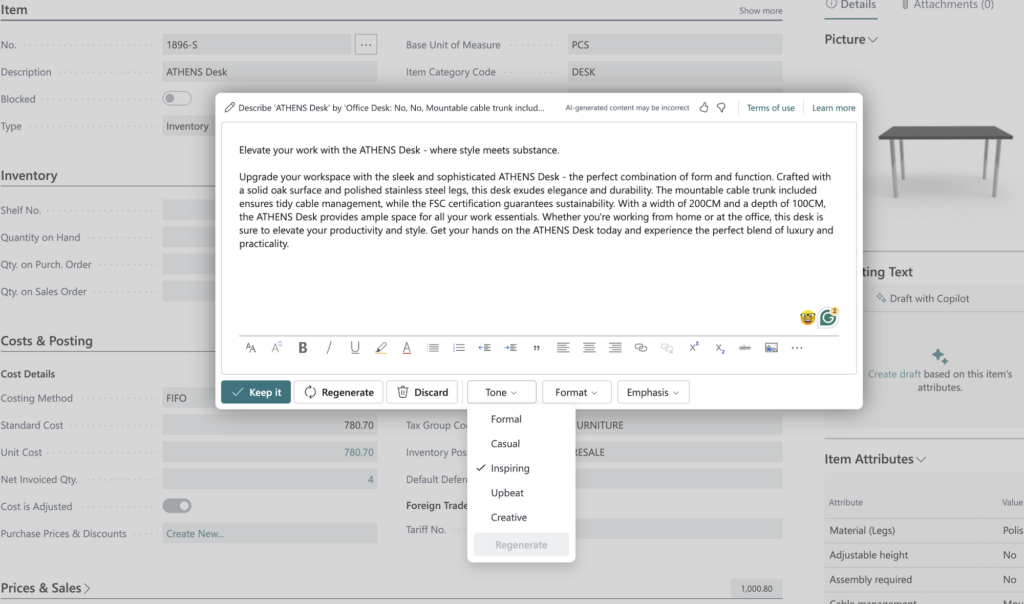
Business Central customers have already become familiar with Microsoft Copilot through capabilities such as assisted marketing text generation, sales line suggestions, cash flow forecasting, and natural language interactions.
Business Central already includes Microsoft Copilot capabilities that help users generate content, analyze data, and streamline everyday tasks. Microsoft continues expanding these AI capabilities toward a more intelligent ERP experience.
The next phase is expected to build on these experiences with more agent-driven business processes.
Unlike Dynamics 365 Sales and Customer Service, Business Central does not yet offer the same catalog of purpose-built AI agents. However, Microsoft continues expanding Copilot capabilities and has signaled a long-term shift toward a more intelligent ERP experience, where AI is expected to play a larger role across purchasing, sales, finance, and operational workflows.
For Business Central customers, preparing for AI goes beyond enabling new features. Organizations should focus on maintaining clean, reliable data, standardizing business processes, and encouraging consistent use of Business Central. These foundational improvements increase the value of today’s Copilot capabilities while helping businesses prepare for future AI agents as they become available.
Related Reading
Wondering what AI can do in Business Central today? Explore how Microsoft Copilot helps users automate routine tasks, generate content, and work more efficiently.
Built-In AI Agents or Custom AI Agents?
Not every organization has the same business processes.
Microsoft provides several prebuilt AI agents for common business scenarios, but some organizations may require capabilities that extend beyond Microsoft’s standard offerings.
This is where Microsoft Copilot Studio becomes an important part of the AI strategy.
Copilot Studio enables organizations to build, customize, and extend AI agents using their own business processes, data sources, and integrations. Rather than starting from scratch, businesses can tailor AI experiences to support unique operational requirements while maintaining governance and security within the Microsoft ecosystem.
For many organizations, the journey will begin with Microsoft’s prebuilt agents before expanding into custom AI solutions as business needs evolve.
Common Misconceptions About AI Agents
As organizations begin exploring AI agents, it’s important to separate expectations from reality. While these capabilities can improve productivity and support business processes, they are not designed to replace ERP systems or operate without human oversight.
Some of the most common misconceptions include:
- AI agents don’t replace Dynamics 365. They extend the capabilities of Dynamics 365 by assisting with specific business processes and workflows.
- AI agents don’t replace employees. Their purpose is to reduce manual effort and administrative work so employees can focus on higher-value activities and business decisions.
- AI agents still require governance. Organizations remain responsible for defining permissions, reviewing AI-generated recommendations, and ensuring compliance with internal policies and regulatory requirements.
Understanding these limitations helps organizations set realistic expectations and develop an AI strategy that supports long-term business goals.
Microsoft also provides guidance on responsible AI to help organizations implement AI capabilities securely, transparently, and in line with governance best practices.
Before You Enable AI Agents, Ask These Five Questions
AI agents can provide significant value, but they are not a shortcut for poorly managed business processes. Before enabling new AI capabilities, organizations should evaluate whether their Dynamics 365 environment is ready.
Consider the following questions:
- Is your business data accurate and well maintained? AI recommendations are only as reliable as the information they analyze.
- Are your business processes standardized? Inconsistent workflows can limit the effectiveness of AI-assisted automation.
- Have you defined governance and security policies? Organizations should establish clear guidelines for permissions, approvals, and responsible AI usage.
- Are employees actively using Dynamics 365? AI delivers the greatest value when business users consistently work within the platform.
- Can success be measured? Identify specific business outcomes, such as reducing reconciliation time, improving lead response times, or increasing case resolution efficiency.
Answering these questions before implementation helps organizations prioritize the right opportunities and establish realistic expectations for AI adoption.
AI Agents Are the Next Step, Not the Final Destination
Microsoft’s investment in AI agents signals a broader evolution of Dynamics 365. The platform is moving beyond AI that simply responds to prompts toward intelligent business applications that can support complete business processes.
While today’s AI agents focus on specific scenarios, Microsoft’s long-term vision is to embed intelligent assistance throughout ERP and CRM operations. As new capabilities are introduced through future release waves, organizations that have already invested in clean data, standardized processes, and strong governance will be in the best position to benefit.
For most businesses, adopting AI agents is not about replacing employees or automating every decision. It is about reducing repetitive work, improving operational efficiency, and enabling teams to spend more time on activities that create value for customers.
Is Your Dynamics 365 Environment Ready for AI?
Every organization is at a different stage of AI adoption.
Calsoft can help you evaluate your current Dynamics 365 environment, identify business processes that are good candidates for AI agents, and develop a practical roadmap based on Microsoft’s latest capabilities.

